Post
Sound of Knowledge: A Real-Time Audiovisual Experience of Wikipedia Edits
Ever wondered what human collaboration sounds like?
Every second, thousands of humans (and bots) add to our collective knowledge on Wikipedia. I wanted to turn this constant stream of raw data into an immersive, zen-like experience where code meets art.
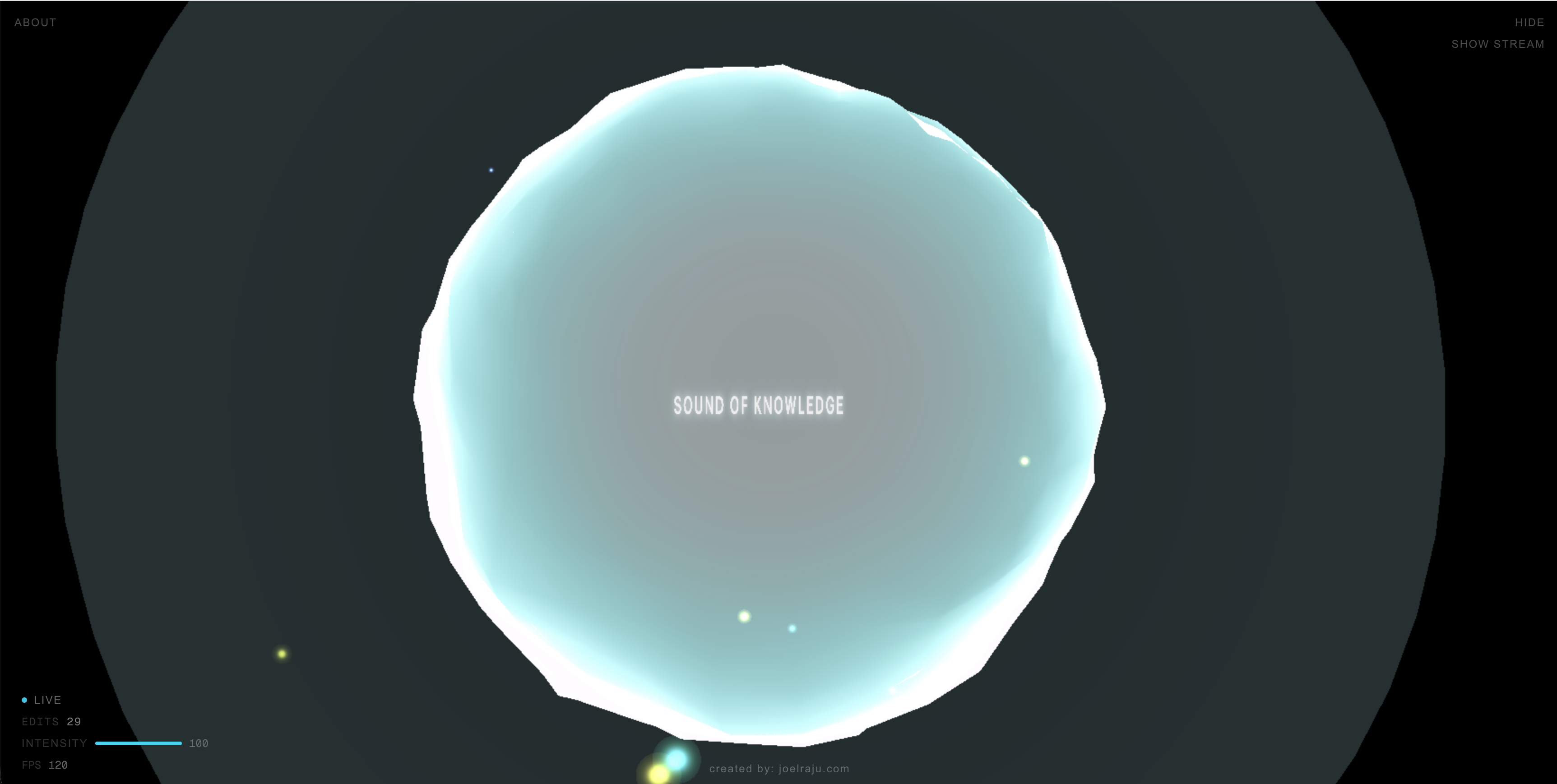
The result is Sound of Knowledge — a real-time, generative audiovisual application that transforms live Wikipedia edits into a living, breathing 3D soundscape. You can experience it live at sound-of-knowledge.vercel.app.
The Data Stream
The core of the application relies on the Wikimedia Recent Changes stream. It's a high-throughput Server-Sent Events (SSE) stream that broadcasts every single edit made across all Wikimedia projects in real-time. We parse this stream on the backend using Next.js App Router, filter for meaningful edit events, and normalize the metadata—extracting the edit size delta, whether it was made by a bot or human, and if it was a revert. This metadata is then piped to the client to drive both the visual and audio engines.
// /app/api/wiki-stream/route.ts
const upstreamRes = await fetch(WIKIMEDIA_SSE, {
  headers: { Accept: "text/event-stream" },
  signal: request.signal,
});

const reader = upstreamRes.body.getReader();
const decoder = new TextDecoder();
let buffer = "";

while (true) {
  const { done, value } = await reader.read();
  if (done) break;

  buffer += decoder.decode(value, { stream: true });
  const lines = buffer.split("\n");
  buffer = lines.pop() ?? "";

  for (const line of lines) {
    if (!line.startsWith("data:")) continue;
    const jsonStr = line.slice(5).trim();

    const raw = JSON.parse(jsonStr);
    if (raw.type !== "edit") continue;

    const event = normalizeEvent(raw);
    controller.enqueue(encoder.encode(`data: ${JSON.stringify(event)}\n\n`));
  }
}
The Visual Experience
The visual side of the project is powered by Three.js and React Three Fiber (R3F). Rather than just rendering a static mesh, I wanted the environment to feel organic and responsive. Here are the core visual components:
- Multi-scale noise displacement shaders react to edit sizes in real-time: At the center of the scene sits a custom procedural shader orb. It isn't a pre-rendered asset; it's entirely generated through math. As edits stream in, their magnitude (calculated from the byte size delta) drives a displacement uniform in the vertex shader. A massive article rewrite literally distorts the geometry of the orb using 3D noise functions, while tiny typo fixes create subtle ripples.
- Particles spawn dynamically from the live SSE stream: Every incoming edit from the Server-Sent Events stream immediately spawns a physical particle in the 3D space, creating a visual meteor shower of data. Instead of creating and destroying Three.js meshes (which is expensive), I used an instanced
BufferGeometrywith a custom particle shader. The particles are pre-allocated in a flatFloat32Arrayarray and managed via a high-performance object pool.
// High-performance particle pooling in React Three Fiber
const freeIndex = particles.findIndex((p) => !p.active);
const p = particles[targetIndex];

// Calculate spawn position using spherical coordinates
const theta = seedNorm(seed, 17) * Math.PI * 2;
const phi = Math.acos(seedNorm(seed, 19) * 2 - 1);
const radius = 1.2 + seedNorm(seed, 23) * 1.5;

p.position.set(
  radius * Math.sin(phi) * Math.cos(theta),
  radius * Math.sin(phi) * Math.sin(theta),
  radius * Math.cos(phi)
);- Custom volumetric glow using additive blending: To give the central orb a spirit-like, ethereal quality, I implemented a custom volumetric inner glow using
THREE.AdditiveBlending. The orb's base and emissive colors also interpolate in real-time based on the edit type (human, bot, or revert), creating a distinct visual rhythm. The fragment shader uses Fractional Brownian Motion (fBm) to create organic swirls and turbulence within the glow.
// Custom volumetric glow using Raymarching and Fractional Brownian Motion (fBm)
void main() {
  // ... raymarching setup ...
  for (int i = 0; i < 18; i++) {
    vec3 pos = ro + rd * t;
    vec3 local = (pos - center) / uRadius;
    float radial = 1.0 - clamp(length(local), 0.0, 1.0);

    // Create organic swirls using fBm
    vec3 swirlP = local * 3.3 + vec3(0.0, uTime * 0.35, 0.0);
    float n = fbm(swirlP + fbm(swirlP.yzx * 0.75 + 9.2));
    float turbulence = n * 0.75 + sin((local.y + uTime * 0.45) * 6.0) * 0.25;

    float sampleDensity = smoothstep(0.28, 0.95, turbulence) * radial;
    density += sampleDensity * stepSize;
    glowAccum += sampleDensity * (0.7 + radial * 0.8);

    t += stepSize;
  }

  // Audio reactivity injected directly into the shader
  density *= 2.2 + uAmplitude * 1.8 + uLowFreq * 0.9;
  glowAccum *= 0.2 + uHighFreq * 0.25;
  // ...
}- Cinematic camera drift that reacts to massive edits: To make the scene feel less like a data dashboard and more like a cinematic experience, I implemented a custom camera drift. The camera slowly orbits the scene using a combination of sine and cosine functions. However, when a massive edit or revert occurs, it triggers a subtle camera shake target that the camera linearly interpolates (
lerp) towards. This shake value slowly decays frame-by-frame, creating a smooth settling effect—as if the camera itself is reacting to the physical weight of the knowledge being added.
For performance, especially on mobile devices, the WebGL context is highly optimized. We dynamically adjust the camera's field of view (FOV), automatically fallback to a simpler shader on low-tier devices (disabling volumetric raymarching), adjust the pixel ratio, disable antialiasing, and process fewer events per frame to maintain a smooth experience.
The Audio Experience
The sound design is perhaps the most unique aspect of the project. There are no pre-recorded samples and no loops. The audio is 100% generative, synthesized in real-time using Tone.js on top of the native Web Audio API.
When an edit event is dequeued on the client, its metadata is routed into a custom synthesis engine. To ensure the sound never becomes a dissonant mess, the engine relies on Modal Harmony. The system shifts between different modal centers (like Lydian or Mixolydian-ish open 5ths) every 16 bars. When an edit occurs, the engine selects notes exclusively from the current active mode.
The size of the edit determines the frequency characteristics of the generated sound:
- Massive Edits: Massive structural changes to a Wikipedia article trigger deep, resonant sub-basses (
Tone.MonoSynth) and a Shepard tone effect on a lush pad (Tone.PolySynth) to give a sense of weight, gravity, and infinite rising. - Tiny Edits: Conversely, tiny edits—like fixing a typo or adjusting punctuation—trigger high-frequency, bell-like chimes randomly selected from the higher octaves of the current modal chord using FM synthesis (
Tone.FMSynth). - Bot Edits & Reverts: Automated bot edits trigger a short percussive thud (
Tone.MembraneSynth), while reverts (undoing a previous edit) trigger a long, metallic gong (Tone.MetalSynth).
// Mapping Wikipedia metadata to generative audio using Tone.js
if (event.isRevert) {
  // Low metallic gong for reverts
  revertSynth.triggerAttackRelease("1n", t, 0.7 + energy * 0.3);
} else if (event.isBot) {
  // Short percussive thud for bot edits
  botSynth.triggerAttackRelease(bassRoots[0], "8n", t, 0.6 + energy * 0.3);
} else {
  if (event.magnitude === "LARGE") {
    // Shepard tone effect: trigger multiple octaves for massive edits
    const shepardChord = [
      rootClass + "1",
      rootClass + "2",
      rootClass + "3",
      rootClass + "4"
    ];
    padSynth.triggerAttackRelease(shepardChord, "2n", t, 0.7 + energy * 0.2);
  } else {
    // Small edits: single high-frequency generative chimes from the modal center
    const modalChord = modalCenters[chordIndex];
    const note = modalChord[Math.floor(Math.random() * modalChord.length)];
    const highNote = note.replace(/(\d)/, (match) => String(parseInt(match) + 1));
    editSynth.triggerAttackRelease(highNote, "4n", t, 0.6 + energy * 0.2);
  }
}
The Visual-Audio Feedback Loop
The visual and audio systems aren't just playing alongside each other; they are physically connected. The entire output of the Tone.js master bus is routed into a set of Tone.Analyser nodes.
// Extracting live frequency data from the audio buffer
function getLowFreq(): number {
  const buf = fftAnalyser.getValue() as Float32Array;
  const slice = buf.slice(0, 8); // Grab the sub-bass frequencies
  let sum = 0;
  for (let i = 0; i < slice.length; i++) sum += Math.max(0, (slice[i] + 100) / 100);
  return Math.min(1, sum / slice.length);
}
Every frame, the React Three Fiber useFrame loop polls these analyzers to extract the current overall amplitude, low frequencies (bass), and high frequencies (treble). These values are fed back into the visual state. The lowFreq value drives the turbulence of the particles and the scale of the inner volumetric glow, while the highFreq value makes the particles flicker brighter. This creates a perfect, zero-latency feedback loop where the audio physically pushes the visual geometry around.
Conclusion
Building Sound of Knowledge was an incredible exercise in bridging the gap between raw data engineering and creative coding. Mapping a high-velocity SSE stream to a 60fps WebGL canvas requires strict memory management—like using typed arrays and object pools instead of garbage-collected objects. At the same time, turning that data into an audio experience required abandoning rigid sequences in favor of generative rules, modal harmony, and feedback loops.
Every byte added to Wikipedia becomes a note in an ever-evolving ambient composition. It turns the chaotic, high-velocity metadata of human collaboration into something oddly peaceful.
If you want to poke around the code, it's open source on GitHub. And if you just want to sit back and watch humanity write an encyclopedia, you can experience it here.